
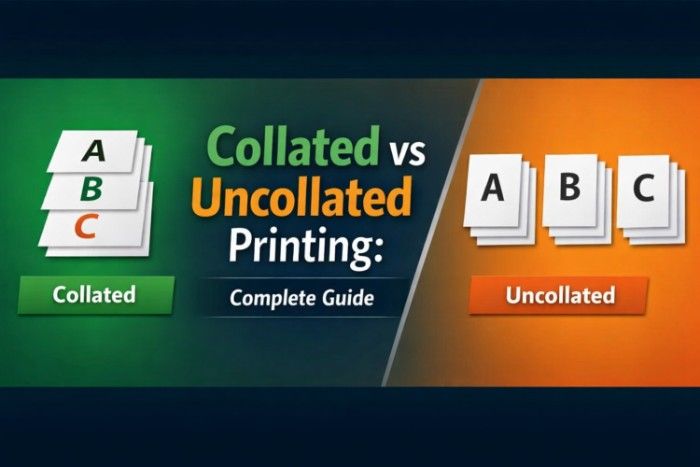
Collated vs Uncollated Printing: Complete Guide

collated vs uncollated printing

When working with documents, printing files, or organizing pages, you’ve probably come across the terms collated and uncollated. At first glance, they seem technical, but the concept is actually very simple—and extremely useful.

Collated printing means pages are printed in the correct sequence as complete sets, while uncollated printing groups identical pages together, requiring manual sorting afterward.

Understanding the difference between collated and uncollated printing can save time, prevent confusion, and help you manage documents more efficiently, especially when printing multiple copies.

In this guide, we’ll break down what these terms mean, how they work in real-life situations, and when you should use each option.


What Does Collated Mean?

Collated refers to arranging pages in a specific, logical order—usually the correct reading sequence.

Let’s say you have a 5-page document:
Page 1 → Page 2 → Page 3 → Page 4 → Page 5

If you print 3 copies with collate ON, the printer will produce:


      • Set 1: 1, 2, 3, 4, 5

      • Set 2: 1, 2, 3, 4, 5

      • Set 3: 1, 2, 3, 4, 5

    Each copy is complete and ready to use.

    This is especially helpful when:


        • Printing reports

        • Creating booklets

        • Preparing presentations

        • Distributing documents to multiple people

      In simple terms, collated = organized sets.


      What Does Uncollated Mean?

      Uncollated printing means pages are grouped by type instead of arranged into complete sets.

      Using the same 5-page document example, printing 3 copies uncollated would produce:


          • Page 1, Page 1, Page 1

          • Page 2, Page 2, Page 2

          • Page 3, Page 3, Page 3

          • Page 4, Page 4, Page 4

          • Page 5, Page 5, Page 5

        So instead of complete sets, you get stacks of identical pages.

        This means you would need to manually sort them into proper order afterward.

        In simple terms, uncollated = grouped but not organized.


        Collated vs Uncollated: Quick Comparison

        Feature Collated Uncollated
        Page Order Correct sequence Grouped by page
        Output Complete document sets Separate page stacks
        Time Saving Yes No (requires manual sorting)
        Best For Reports, booklets, presentations Bulk printing, binding, sorting
        Effort Required Minimal More manual work


        How Collation Works in Printing

        When you select the collate option in your printer settings, the printer processes the entire document as one unit before moving to the next copy.

        This requires:


            • More processing by the printer

            • Slightly more time per copy

            • Better organization of output

          Modern printers handle this automatically, so you don’t need to worry about the complexity behind it.


          How Uncollated Printing Works

          With uncollated printing, the printer focuses on one page at a time and prints all copies of that page before moving to the next.

          This method:


              • Is faster in some cases

              • Uses simpler processing

              • Produces grouped stacks of pages

            However, it shifts the burden of organizing onto you.


            Real-Life Examples

            Example 1: Printing a School Assignment

            If you need to submit 5 copies of a 10-page assignment:


                • Collated: Each copy is printed in full order → ready to submit

                • Uncollated: You get piles of each page → must arrange manually

              👉 Best choice: Collated


              Example 2: Printing Handouts for a Meeting

              Imagine printing 50 copies of a 3-page handout.


                  • Collated: 50 complete sets → easy distribution

                  • Uncollated: 3 stacks of pages → you must assemble

                👉 Best choice: Collated


                Example 3: Printing for Binding or Stapling

                If you’re sending pages for binding:


                    • Uncollated: Easier to stack and process in bulk

                    • Collated: May slow down large print jobs

                  👉 Best choice: Uncollated (sometimes)


                  Example 4: Printing Large Volume Jobs

                  For very large print runs (like 500+ copies):


                      • Uncollated printing can be faster

                      • Useful in industrial or bulk printing setups

                    👉 Best choice: Uncollated (for speed and batching)


                    When Should You Use Collated Printing?

                    Collated printing is ideal when:


                        • You need complete documents immediately

                        • You are printing multiple copies of reports

                        • You want to avoid manual sorting

                        • You are preparing presentations or study materials

                      Basically, if humans will read or use the documents directly, collated is the better option.


                      When Should You Use Uncollated Printing?

                      Uncollated printing works best when:


                          • You are printing large quantities

                          • You plan to sort or process pages later

                          • You are using external binding or finishing services

                          • You want faster print output in bulk

                        If the goal is production efficiency rather than convenience, uncollated can be useful.


                        Collated vs Uncollated in Different Devices

                        Printers

                        Most modern printers (HP, Canon, Epson) offer a simple checkbox for collation in print settings.

                        Photocopiers

                        Collation is commonly used in office copiers when duplicating multi-page documents.

                        PDF Software

                        Programs like Adobe Acrobat allow you to choose collation before printing.


                        Common Mistakes People Make

                        1. Ignoring the Collate Option

                        Many users don’t notice the checkbox and end up with disorganized pages.

                        2. Choosing Uncollated by Default

                        Some printers default to uncollated, especially in bulk settings.

                        3. Confusing Speed with Efficiency

                        Uncollated may print faster—but requires more manual work later.


                        Does Collating Affect Printing Speed?

                        Yes, slightly.


                            • Collated printing: Slower because the printer organizes sets

                            • Uncollated printing: Faster since it prints page batches

                          However, for small jobs, the difference is usually negligible.


                          Does Collating Use More Ink or Paper?

                          No.

                          Both collated and uncollated printing:


                              • Use the same amount of ink

                              • Use the same number of pages

                            The only difference is the order of output.


                            Why Collation Matters More Than You Think

                            Collation might seem like a small setting, but it has a big impact on productivity.

                            Choosing the wrong option can lead to:


                                • Wasted time

                                • Confusion

                                • Disorganized documents

                                • Frustration during meetings or submissions

                              On the other hand, using the right option makes your workflow smooth and efficient.


                              Simple Trick to Remember the Difference


                                  • Collated = Complete sets

                                  • Uncollated = Unorganized stacks

                                Or even simpler:

                                Collated = Ready to use
                                Uncollated = Needs sorting

                                How to Turn Collate ON or OFF (Step-by-Step)

                                Most people struggle not because the concept is hard—but because they can’t find the setting.

                                Here’s how to do it easily:

                                On Windows (Any Printer)


                                    1. Open your document

                                    1. Press Ctrl + P

                                    1. Select your printer

                                    1. Look for “Collate” checkbox

                                    1. Check or uncheck it

                                    1. Click Print


                                  On Mac


                                      1. Open the file

                                      1. Press Command + P

                                      1. Expand print settings (if hidden)

                                      1. Find “Collated” option

                                      1. Enable or disable it

                                      1. Print your document


                                    On PDF (Adobe Reader / Browser)


                                        • Open PDF

                                        • Click Print

                                        • Look for “Collate” option

                                        • Toggle it based on your need


                                      On Office Printers / Photocopiers


                                          • Select number of copies

                                          • Choose Collate / Uncollate button

                                          • Start printing

                                        Most office printers even show a small icon:


                                            • 📄📄📄 (stacked sets) = Collated

                                            • 📄📄📄 (grouped pages) = Uncollated


                                          Visual Example (Easy to Understand)

                                          Let’s simplify with a quick example:

                                          Document: 3 Pages (A, B, C) — 2 Copies

                                          Collated Output


                                              • A, B, C

                                              • A, B, C

                                            👉 Ready-to-use sets


                                            Uncollated Output


                                                • A, A

                                                • B, B

                                                • C, C

                                              👉 Needs manual sorting


                                              Collated vs Uncollated in Real Work Environments

                                              1. Offices

                                              In offices, collated printing is used almost everywhere:


                                                  • Reports

                                                  • Client documents

                                                  • Meeting handouts

                                                Because no one wants to sort pages manually.


                                                2. Schools & Universities

                                                Students and teachers often print:


                                                    • Assignments

                                                    • Notes

                                                    • Exam papers

                                                  Collated printing saves time, especially during submissions.


                                                  3. Printing Shops

                                                  Interestingly, print shops often use uncollated printing for efficiency.

                                                  Why?

                                                  Because they:


                                                      • Use machines to sort pages later

                                                      • Print in bulk batches

                                                      • Bind documents afterward


                                                    4. Businesses & Bulk Printing

                                                    For large-scale printing:


                                                        • Uncollated = faster production

                                                        • Collated = ready-to-distribute documents

                                                      Businesses choose based on workflow.


                                                      Advanced Use Cases You Should Know

                                                      1. Booklet Printing

                                                      When printing booklets or manuals:


                                                          • Collated printing ensures correct order

                                                          • Prevents binding errors


                                                        2. Stapling & Binding

                                                        If your printer has a stapler:


                                                            • Collated = automatic stapled sets

                                                            • Uncollated = unusable for stapling


                                                          3. Double-Sided Printing

                                                          Collation becomes even more important with duplex printing.

                                                          Wrong setting = completely mixed pages.


                                                          4. Legal & Professional Documents

                                                          For contracts, proposals, or legal files:


                                                              • Collated printing is essential

                                                              • Mistakes can cause serious confusion


                                                            Common Problems and How to Fix Them

                                                            Problem 1: Pages Printed in Wrong Order

                                                            Cause: Collate turned OFF
                                                            Solution: Enable collate before printing


                                                            Problem 2: Printer Ignoring Collate Setting

                                                            Cause: Printer driver issue
                                                            Solution:


                                                                • Update printer driver

                                                                • Restart printer

                                                                • Try printing from another software


                                                              Problem 3: Slow Printing Speed

                                                              Cause: Collation enabled for large jobs
                                                              Solution:


                                                                  • Use uncollated for bulk printing

                                                                  • Sort later if needed


                                                                Problem 4: Mixed-Up Pages in Duplex Printing

                                                                Cause: Wrong combination of settings
                                                                Solution:


                                                                    • Check both duplex and collate options carefully


                                                                  Collated vs Uncollated: Which One Should You Choose?

                                                                  Here’s a simple decision guide:

                                                                  Choose Collated if:


                                                                      • You need ready-to-use documents

                                                                      • You’re printing reports or assignments

                                                                      • You want to save time

                                                                      • You’re distributing copies


                                                                    Choose Uncollated if:


                                                                        • You’re printing in bulk

                                                                        • You’ll organize pages later

                                                                        • You’re using binding machines

                                                                        • You want faster printing

                                                                      Still confused about how collating works in printers and documents? You can explore more detailed guides on what does collate mean, what does collate mean when printing, and collate meaning printer for a clearer understanding.

                                                                      Conclusion

                                                                      Understanding the difference between collated and uncollated printing is simple—but incredibly useful in everyday tasks.


                                                                          • Collated printing keeps your documents organized and ready to use

                                                                          • Uncollated printing focuses on speed and bulk processing

                                                                        Choosing the right option depends on your workflow. For most everyday printing needs, collated is the best choice. But for large-scale or production-level tasks, uncollated printing can be more efficient.

                                                                        Once you get used to this setting, you’ll never struggle with messy printouts again.


                                                                        FAQs
                                                                        Here are the most commonly asked questions about collated vs uncollated printing and how it works.
                                                                        What is the main difference between collated and uncollated?
                                                                        Collated printing produces complete document sets in the correct order, while uncollated printing groups identical pages together, requiring manual sorting.
                                                                        Which is better: collated or uncollated?
                                                                        It depends on your needs. Collated printing is better for convenience and ready-to-use documents, while uncollated printing is useful for bulk printing and faster output.
                                                                        Does collated printing take longer?
                                                                        Yes, slightly. The printer takes extra time to organize pages into complete sets before printing the next copy.
                                                                        Does uncollated printing save time?
                                                                        Yes, it can save time during printing because pages are printed in batches. However, you may spend extra time sorting them afterward.
                                                                        Is collate important for double-sided printing?
                                                                        Yes, it is very important. Without collation, double-sided (duplex) printing can result in mixed or disorganized pages.
                                                                        Why is my printer printing uncollated?
                                                                        This usually happens due to default printer settings, a disabled collate option, or outdated printer drivers. Check your print settings before printing.
                                                                        Does collating affect print quality?
                                                                        No, collating only changes the order of printed pages. It does not affect print quality, ink usage, or paper consumption.