Picture this: you’ve ordered 500 copies of a 50-page training manual for your team’s big onboarding day. The boxes arrive, you tear one open, and your heart sinks. Instead of neat, ready-to-read booklets, you’re staring at towering stacks of single pages—500 copies of page 1, then 500 of page 2, and so on. Now you’re facing hours (or days!) of sorting before a single manual is usable. Yikes!
That nightmare scenario is exactly what collation prevents. It’s one of those behind-the-scenes printing details that quietly makes or breaks your project. By the end of this guide, you’ll know exactly what collation is, why it matters so much in commercial printing, how to choose between collated and uncollated printing, and how professional printers pull it off with impressive precision. Let’s dive in!
What Is Collation in Commercial Printing?
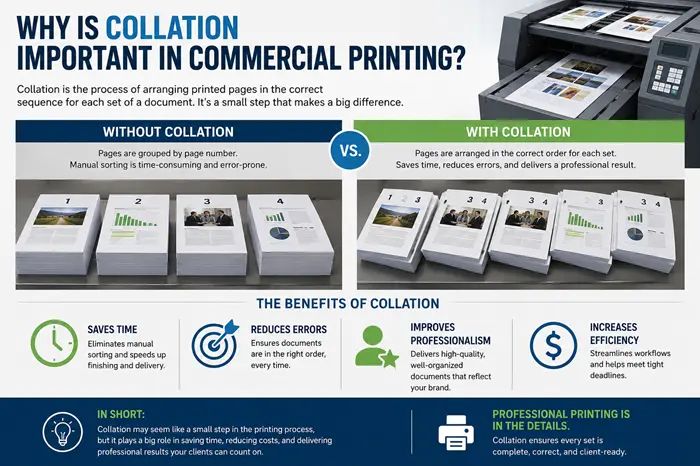
Collation is the process of gathering and arranging the individual pages of a multi-page document into the correct reading order before finishing or binding. In other words, it makes sure your pages come out as 1, 2, 3, 4, 5—just like a book should read.
Here’s a simple example to make it crystal clear. Say you have a 3-page document and you want 5 copies:
- Collated printing arranges each complete set in order: 1-2-3, 1-2-3, 1-2-3, 1-2-3, 1-2-3.
- Uncollated printing stacks identical pages together: 1-1-1-1-1, then 2-2-2-2-2, then 3-3-3-3-3.
See the difference? Collated copies are ready to read or bind right away, while uncollated copies require someone to manually assemble them into order. For a small job, that’s a minor hassle. For a large commercial run, it’s a massive undertaking.
Why Collation Matters in Commercial Printing
So why is this little detail such a big deal? Because collation does far more than tidy up your pages—it influences your entire production workflow, your costs, and how your brand is perceived.
Think about client-facing materials like sales kits, investor reports, or training guides. If the pages are out of sequence, the document instantly looks sloppy and confusing. Wrong page order can undermine your credibility before anyone even reads the content! Proper collation ensures every set tells your story in exactly the right order.
Collation also keeps the production line moving. When pages arrive at the finishing stage already in sequence, they’re ready for immediate binding—no manual sorting required. Skip collation, and you introduce delays, errors, and a whole lot of tedious handwork.
The Benefits of Collation for Print Jobs
Let’s break down the specific perks you’ll enjoy when your print job is properly collated:
- Streamlined finishing and binding: Well-collated documents are primed for binding methods like saddle stitching, spiral binding, stapling, and perfect binding. Everything flows faster.
- Fewer errors: Modern commercial presses use automated collation systems that organize pages with remarkable accuracy, so you don’t have to worry about a stray page sneaking into the wrong spot.
- Lower labor costs: Manual collation is incredibly time-consuming, and on a bulk order, those labor hours add up fast. Automated collation keeps your costs in check.
- A better customer experience: For instruction booklets, warranty inserts, or product manuals tucked inside packaging, proper collation means your end-user gets a seamless, easy-to-follow document. Those little details add up to big brand love!
Collated vs Uncollated: When to Use Each
Here’s the good news—there’s no universally “right” or “wrong” choice. It all comes down to what your project needs. Let me help you decide!
Choose collated printing when your document has multiple pages that must be read in sequence, or when you’re handing out complete packets of information. Great examples include:
- Product catalogs
- Instruction manuals
- Corporate reports
- Event programs
- Training booklets and educational materials
- Multi-page marketing brochures
- Onboarding and presentation folders
A handy rule of thumb: if your print job needs to be bound like a book, you’ll want it collated.
Choose uncollated printing when your pages are distributed individually or don’t need a particular order. Think:
- Flyers and single-page handouts
- Business cards
- Menus and posters
- Forms where people grab only the sheet that applies to them
- Inserts that will be assembled in a custom order later
For instance, if you’ve got three stacks of different forms on a counter and folks pick the one they need, uncollated is the way to go. Printing those collated would force everyone to dig through the whole stack—no thanks!
How Commercial Printers Handle Collation
Curious how the pros make this happen? It depends on the printing method, and both are pretty fascinating.
Digital printing manages collation through software settings. The press automatically arranges pages in the correct order as they print, so each copy emerges fully collated and ready to go. This approach shines for short runs and customized or variable-data print jobs where flexibility is key.
Offset printing handles collation during the finishing stage. Pages are printed, then mechanically stacked and gathered in the correct sequence by high-speed collating equipment before binding. Because of its consistency and cost-efficiency at scale, offset is the go-to for large-volume production.
Either way, quality control is the secret ingredient. Reputable printers build in checks to verify page order and catch any mistakes before your project ships, so what lands on your doorstep is exactly what you envisioned.
Get Your Next Print Job Right
Collation might seem like a tiny technical detail, but as you’ve seen, it plays a huge role in delivering professional, functional, and ready-to-use printed materials. From slashing labor costs and speeding up binding to protecting your brand’s polished image, getting collation right makes everything downstream easier.
The best way to guarantee flawless results? Communicate your needs clearly with your printer. Always confirm your total page count, the number of copies, your preferred binding method, and whether you want collated or uncollated printing. A quick conversation upfront prevents headaches later!
If you’d like to dig even deeper into the topic, check out our complete guide, What Is Collate Printing? And when you’re ready to bring your next multi-page project to life, partner with an experienced commercial printer who’ll handle collation, finishing, and every detail in between—so you can focus on what you do best. Happy printing!